
Context-Visibility Error on Cisco ISE 3.0 How to Fix
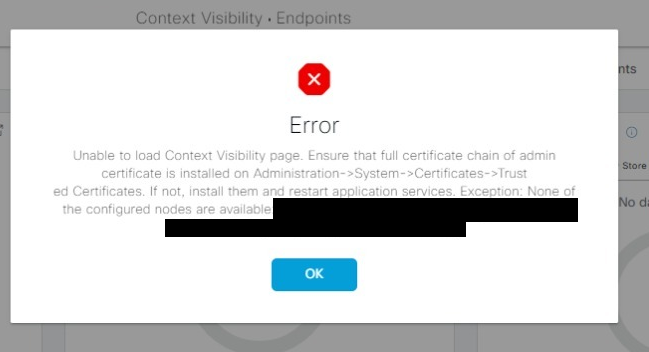

But when I dig down deeper into the sea of Cisco documentation, I’ve got the enlightenment from one of the threads in the Cisco Support Forum. It says that for this Context-Visibility error I just have to reset the Context-Visibility and then connect it to the database. It does not restart the Application Server, just a few interactive commands via the CLI to Cisco ISE console. The time I need to finish this task was only around 15 minutes. To put it into context, this is a single-node deployment, on a Virtual Machine with VM Small requirement. The time needed might be different in regard to your deployment condition. Without further ado, let’s get into business.
First, gain SSH access into the ISE CLI. When you have access, perform this command:
application config ise
Then choose option 20 to reset the Context Visibility. It will take some time. Don’t close your console or send Ctrl + C at this time.
ise-packetnotes/admin# app config ise

Selection configuration option
[1]Reset M&T Session Database
[2]Rebuild M&T Unusable Indexes
[3]Purge M&T Operational Data
[4]Reset M&T Database
[5]Refresh Database Statistics
[6]Display Profiler Statistics
[7]Export Internal CA Store
[8]Import Internal CA Store
[9]Create Missing Config Indexes
[10]Create Missing M&T Indexes
[11]Enable/Disable ACS Migration
[12]Generate Daily KPM Stats
[13]Generate KPM Stats for last 8 Weeks
[14]Enable/Disable Counter Attribute Collection
[15]View Admin Users
[16]Get all Endpoints
[19]Establish Trust with controller
[20]Reset Context Visibility
[21]Synchronize Context Visibility With Database
[22]Generate Heap Dump
[23]Generate Thread Dump
[24]Force Backup Cancellation
[25]CleanUp ESR 5921 IOS Crash Info Files
[26]Recreate undotablespace
[27]Configure TCP params
[28]Fetch SGA/PGA Memory usage
[0]Exit

20
This will remove all data from Context Visibility. Do you want to proceed [y/n]: y
Checking ISE persona
  - Done
Stopping monit services
  - Done
Stopping ISE indexing engine
  - Done
Unzip and making changes to vcs jar
  - Done
Modifying ISE indexing engine configuration
  - Done
Removing ISE indexing engine data folder
  - Done
Starting ISE indexing engine
  - Done
Performing reset of ISE indexing engine
  - Done
Stopping ISE indexing engine
  - Done
Removing backup of vcs jar
  - Done
Reverting changes to ISE indexing engine configuration
  - Done
Starting ISE indexing engine
  - Done
Starting monit services
  - Done
Reset of Context Visibility is successful on this node

Selection configuration option
[1]Reset M&T Session Database
[2]Rebuild M&T Unusable Indexes
[3]Purge M&T Operational Data
[4]Reset M&T Database
[5]Refresh Database Statistics
[6]Display Profiler Statistics
[7]Export Internal CA Store
[8]Import Internal CA Store
[9]Create Missing Config Indexes
[10]Create Missing M&T Indexes
[11]Enable/Disable ACS Migration
[12]Generate Daily KPM Stats
[13]Generate KPM Stats for last 8 Weeks
[14]Enable/Disable Counter Attribute Collection
[15]View Admin Users
[16]Get all Endpoints
[19]Establish Trust with controller
[20]Reset Context Visibility
[21]Synchronize Context Visibility With Database
[22]Generate Heap Dump
[23]Generate Thread Dump
[24]Force Backup Cancellation
[25]CleanUp ESR 5921 IOS Crash Info Files
[26]Recreate undotablespace
[27]Configure TCP params
[28]Fetch SGA/PGA Memory usage
[0]Exit
For the next step, we will sync the CV with the database, choose option 21. When it’s done, choose option 0 to exit.
Selection configuration option
[1]Reset M&T Session Database
[2]Rebuild M&T Unusable Indexes
[3]Purge M&T Operational Data
[4]Reset M&T Database
[5]Refresh Database Statistics
[6]Display Profiler Statistics
[7]Export Internal CA Store
[8]Import Internal CA Store
[9]Create Missing Config Indexes
[10]Create Missing M&T Indexes
[11]Enable/Disable ACS Migration
[12]Generate Daily KPM Stats
[13]Generate KPM Stats for last 8 Weeks
[14]Enable/Disable Counter Attribute Collection
[15]View Admin Users
[16]Get all Endpoints
[19]Establish Trust with controller
[20]Reset Context Visibility
[21]Synchronize Context Visibility With Database
[22]Generate Heap Dump
[23]Generate Thread Dump
[24]Force Backup Cancellation
[25]CleanUp ESR 5921 IOS Crash Info Files
[26]Recreate undotablespace
[27]Configure TCP params
[28]Fetch SGA/PGA Memory usage
[0]Exit

21
This will synchronize Context Visibility with database. Do you want to proceed [y/n]: y
Copying files
  - Done
Changing permissions
  - Done
Exporting endpoints from database
  - Done
Importing endpoints into context visibility
  - Done

Synchronization of Context Visibility with Oracle is successful

Selection configuration option
[1]Reset M&T Session Database
[2]Rebuild M&T Unusable Indexes
[3]Purge M&T Operational Data
[4]Reset M&T Database
[5]Refresh Database Statistics
[6]Display Profiler Statistics
[7]Export Internal CA Store
[8]Import Internal CA Store
[9]Create Missing Config Indexes
[10]Create Missing M&T Indexes
[11]Enable/Disable ACS Migration
[12]Generate Daily KPM Stats
[13]Generate KPM Stats for last 8 Weeks
[14]Enable/Disable Counter Attribute Collection
[15]View Admin Users
[16]Get all Endpoints
[19]Establish Trust with controller
[20]Reset Context Visibility
[21]Synchronize Context Visibility With Database
[22]Generate Heap Dump
[23]Generate Thread Dump
[24]Force Backup Cancellation
[25]CleanUp ESR 5921 IOS Crash Info Files
[26]Recreate undotablespace
[27]Configure TCP params
[28]Fetch SGA/PGA Memory usage
[0]Exit

0
Try to perform the command
show app status ise
to check whether the services are running well.
ise-packetnotes/admin# sh app status ise
ISE PROCESS NAME                       STATE            PROCESS ID
--------------------------------------------------------------------
Database Listener                      running          24633
Database Server                        running          125 PROCESSES
Application Server                     running          4864
Profiler Database                      running          31298
ISE Indexing Engine                    running          23873
AD Connector                           running          6858
M&T Session Database                   running          32456
M&T Log Processor                      running          5070
Certificate Authority Service          running          6518
EST Service                            running          6994
SXP Engine Service                     disabled
Docker Daemon                          running          26141
TC-NAC Service                         disabled
pxGrid Infrastructure Service          disabled
pxGrid Publisher Subscriber Service    disabled
pxGrid Connection Manager              disabled
pxGrid Controller                      disabled
PassiveID WMI Service                  disabled
PassiveID Syslog Service               disabled
PassiveID API Service                  disabled
PassiveID Agent Service                disabled
PassiveID Endpoint Service             disabled
PassiveID SPAN Service                 disabled
DHCP Server (dhcpd)                    disabled
DNS Server (named)                     disabled
ISE Messaging Service                  running          27694
ISE API Gateway Database Service       running          31331
ISE API Gateway Service                running          19308
Segmentation Policy Service            disabled
REST Auth Service                      disabled
SSE Connector                          disabled
Try to log out and re-login into the Cisco ISE dashboard, the error should be disappeared.
This should fix the Context-Visibility Error on Cisco ISE 3.0. We can use the same method for the other version of ISE starting from version 2.3.
I hope this helps and is informative, please comment if you have any opinion. Thank you
But when I dig down deeper into the sea of Cisco documentation, I’ve got the enlightenment from one of the threads in the Cisco Support Forum. It says that for this Context-Visibility error I just have to reset the Context-Visibility and then connect it to the database. It does not restart the Application Server, just a few interactive commands via the CLI to Cisco ISE console. The time I need to finish this task was only around 15 minutes. To put it into context, this is a single-node deployment, on a Virtual Machine with VM Small requirement. The time needed might be different in regard to your deployment condition. Without further ado, let’s get into business.
First, gain SSH access into the ISE CLI. When you have access, perform this command:
application config ise
Then choose option 20 to reset the Context Visibility. It will take some time. Don’t close your console or send Ctrl + C at this time.
ise-packetnotes/admin# app config ise

Selection configuration option
[1]Reset M&T Session Database
[2]Rebuild M&T Unusable Indexes
[3]Purge M&T Operational Data
[4]Reset M&T Database
[5]Refresh Database Statistics
[6]Display Profiler Statistics
[7]Export Internal CA Store
[8]Import Internal CA Store
[9]Create Missing Config Indexes
[10]Create Missing M&T Indexes
[11]Enable/Disable ACS Migration
[12]Generate Daily KPM Stats
[13]Generate KPM Stats for last 8 Weeks
[14]Enable/Disable Counter Attribute Collection
[15]View Admin Users
[16]Get all Endpoints
[19]Establish Trust with controller
[20]Reset Context Visibility
[21]Synchronize Context Visibility With Database
[22]Generate Heap Dump
[23]Generate Thread Dump
[24]Force Backup Cancellation
[25]CleanUp ESR 5921 IOS Crash Info Files
[26]Recreate undotablespace
[27]Configure TCP params
[28]Fetch SGA/PGA Memory usage
[0]Exit

20
This will remove all data from Context Visibility. Do you want to proceed [y/n]: y
Checking ISE persona
  - Done
Stopping monit services
  - Done
Stopping ISE indexing engine
  - Done
Unzip and making changes to vcs jar
  - Done
Modifying ISE indexing engine configuration
  - Done
Removing ISE indexing engine data folder
  - Done
Starting ISE indexing engine
  - Done
Performing reset of ISE indexing engine
  - Done
Stopping ISE indexing engine
  - Done
Removing backup of vcs jar
  - Done
Reverting changes to ISE indexing engine configuration
  - Done
Starting ISE indexing engine
  - Done
Starting monit services
  - Done
Reset of Context Visibility is successful on this node

Selection configuration option
[1]Reset M&T Session Database
[2]Rebuild M&T Unusable Indexes
[3]Purge M&T Operational Data
[4]Reset M&T Database
[5]Refresh Database Statistics
[6]Display Profiler Statistics
[7]Export Internal CA Store
[8]Import Internal CA Store
[9]Create Missing Config Indexes
[10]Create Missing M&T Indexes
[11]Enable/Disable ACS Migration
[12]Generate Daily KPM Stats
[13]Generate KPM Stats for last 8 Weeks
[14]Enable/Disable Counter Attribute Collection
[15]View Admin Users
[16]Get all Endpoints
[19]Establish Trust with controller
[20]Reset Context Visibility
[21]Synchronize Context Visibility With Database
[22]Generate Heap Dump
[23]Generate Thread Dump
[24]Force Backup Cancellation
[25]CleanUp ESR 5921 IOS Crash Info Files
[26]Recreate undotablespace
[27]Configure TCP params
[28]Fetch SGA/PGA Memory usage
[0]Exit
For the next step, we will sync the CV with the database, choose option 21. When it’s done, choose option 0 to exit.
Selection configuration option
[1]Reset M&T Session Database
[2]Rebuild M&T Unusable Indexes
[3]Purge M&T Operational Data
[4]Reset M&T Database
[5]Refresh Database Statistics
[6]Display Profiler Statistics
[7]Export Internal CA Store
[8]Import Internal CA Store
[9]Create Missing Config Indexes
[10]Create Missing M&T Indexes
[11]Enable/Disable ACS Migration
[12]Generate Daily KPM Stats
[13]Generate KPM Stats for last 8 Weeks
[14]Enable/Disable Counter Attribute Collection
[15]View Admin Users
[16]Get all Endpoints
[19]Establish Trust with controller
[20]Reset Context Visibility
[21]Synchronize Context Visibility With Database
[22]Generate Heap Dump
[23]Generate Thread Dump
[24]Force Backup Cancellation
[25]CleanUp ESR 5921 IOS Crash Info Files
[26]Recreate undotablespace
[27]Configure TCP params
[28]Fetch SGA/PGA Memory usage
[0]Exit

21
This will synchronize Context Visibility with database. Do you want to proceed [y/n]: y
Copying files
  - Done
Changing permissions
  - Done
Exporting endpoints from database
  - Done
Importing endpoints into context visibility
  - Done

Synchronization of Context Visibility with Oracle is successful

Selection configuration option
[1]Reset M&T Session Database
[2]Rebuild M&T Unusable Indexes
[3]Purge M&T Operational Data
[4]Reset M&T Database
[5]Refresh Database Statistics
[6]Display Profiler Statistics
[7]Export Internal CA Store
[8]Import Internal CA Store
[9]Create Missing Config Indexes
[10]Create Missing M&T Indexes
[11]Enable/Disable ACS Migration
[12]Generate Daily KPM Stats
[13]Generate KPM Stats for last 8 Weeks
[14]Enable/Disable Counter Attribute Collection
[15]View Admin Users
[16]Get all Endpoints
[19]Establish Trust with controller
[20]Reset Context Visibility
[21]Synchronize Context Visibility With Database
[22]Generate Heap Dump
[23]Generate Thread Dump
[24]Force Backup Cancellation
[25]CleanUp ESR 5921 IOS Crash Info Files
[26]Recreate undotablespace
[27]Configure TCP params
[28]Fetch SGA/PGA Memory usage
[0]Exit

0
Try to perform the command
show app status ise
to check whether the services are running well.
ise-packetnotes/admin# sh app status ise
ISE PROCESS NAME                       STATE            PROCESS ID
--------------------------------------------------------------------
Database Listener                      running          24633
Database Server                        running          125 PROCESSES
Application Server                     running          4864
Profiler Database                      running          31298
ISE Indexing Engine                    running          23873
AD Connector                           running          6858
M&T Session Database                   running          32456
M&T Log Processor                      running          5070
Certificate Authority Service          running          6518
EST Service                            running          6994
SXP Engine Service                     disabled
Docker Daemon                          running          26141
TC-NAC Service                         disabled
pxGrid Infrastructure Service          disabled
pxGrid Publisher Subscriber Service    disabled
pxGrid Connection Manager              disabled
pxGrid Controller                      disabled
PassiveID WMI Service                  disabled
PassiveID Syslog Service               disabled
PassiveID API Service                  disabled
PassiveID Agent Service                disabled
PassiveID Endpoint Service             disabled
PassiveID SPAN Service                 disabled
DHCP Server (dhcpd)                    disabled
DNS Server (named)                     disabled
ISE Messaging Service                  running          27694
ISE API Gateway Database Service       running          31331
ISE API Gateway Service                running          19308
Segmentation Policy Service            disabled
REST Auth Service                      disabled
SSE Connector                          disabled
Try to log out and re-login into the Cisco ISE dashboard, the error should be disappeared.
This should fix the Context-Visibility Error on Cisco ISE 3.0. We can use the same method for the other version of ISE starting from version 2.3.
I hope this helps and is informative, please comment if you have any opinion. Thank you
I have got this Context-Visibility Error on Cisco ISE 3.0 when I’ve just finished installing the new deployment of Cisco ISE on one of my customers. At first, it seems like a certificate error message, but the certificates installed seemed right, no expired certificates and there is no problem with the Trusted Certificates and System Certificates.
But when I dig down deeper into the sea of Cisco documentation, I’ve got the enlightenment from one of the threads in the Cisco Support Forum. It says that for this Context-Visibility error I just have to reset the Context-Visibility and then connect it to the database. It does not restart the Application Server, just a few interactive commands via the CLI to Cisco ISE console. The time I need to finish this task was only around 15 minutes. To put it into context, this is a single-node deployment, on a Virtual Machine with VM Small requirement. The time needed might be different in regard to your deployment condition. Without further ado, let’s get into business.
First, gain SSH access into the ISE CLI. When you have access, perform this command:
application config ise
Then choose option 20 to reset the Context Visibility. It will take some time. Don’t close your console or send Ctrl + C at this time.
ise-packetnotes/admin# app config ise

Selection configuration option
[1]Reset M&T Session Database
[2]Rebuild M&T Unusable Indexes
[3]Purge M&T Operational Data
[4]Reset M&T Database
[5]Refresh Database Statistics
[6]Display Profiler Statistics
[7]Export Internal CA Store
[8]Import Internal CA Store
[9]Create Missing Config Indexes
[10]Create Missing M&T Indexes
[11]Enable/Disable ACS Migration
[12]Generate Daily KPM Stats
[13]Generate KPM Stats for last 8 Weeks
[14]Enable/Disable Counter Attribute Collection
[15]View Admin Users
[16]Get all Endpoints
[19]Establish Trust with controller
[20]Reset Context Visibility
[21]Synchronize Context Visibility With Database
[22]Generate Heap Dump
[23]Generate Thread Dump
[24]Force Backup Cancellation
[25]CleanUp ESR 5921 IOS Crash Info Files
[26]Recreate undotablespace
[27]Configure TCP params
[28]Fetch SGA/PGA Memory usage
[0]Exit

20
This will remove all data from Context Visibility. Do you want to proceed [y/n]: y
Checking ISE persona
  - Done
Stopping monit services
  - Done
Stopping ISE indexing engine
  - Done
Unzip and making changes to vcs jar
  - Done
Modifying ISE indexing engine configuration
  - Done
Removing ISE indexing engine data folder
  - Done
Starting ISE indexing engine
  - Done
Performing reset of ISE indexing engine
  - Done
Stopping ISE indexing engine
  - Done
Removing backup of vcs jar
  - Done
Reverting changes to ISE indexing engine configuration
  - Done
Starting ISE indexing engine
  - Done
Starting monit services
  - Done
Reset of Context Visibility is successful on this node

Selection configuration option
[1]Reset M&T Session Database
[2]Rebuild M&T Unusable Indexes
[3]Purge M&T Operational Data
[4]Reset M&T Database
[5]Refresh Database Statistics
[6]Display Profiler Statistics
[7]Export Internal CA Store
[8]Import Internal CA Store
[9]Create Missing Config Indexes
[10]Create Missing M&T Indexes
[11]Enable/Disable ACS Migration
[12]Generate Daily KPM Stats
[13]Generate KPM Stats for last 8 Weeks
[14]Enable/Disable Counter Attribute Collection
[15]View Admin Users
[16]Get all Endpoints
[19]Establish Trust with controller
[20]Reset Context Visibility
[21]Synchronize Context Visibility With Database
[22]Generate Heap Dump
[23]Generate Thread Dump
[24]Force Backup Cancellation
[25]CleanUp ESR 5921 IOS Crash Info Files
[26]Recreate undotablespace
[27]Configure TCP params
[28]Fetch SGA/PGA Memory usage
[0]Exit
For the next step, we will sync the CV with the database, choose option 21. When it’s done, choose option 0 to exit.
Selection configuration option
[1]Reset M&T Session Database
[2]Rebuild M&T Unusable Indexes
[3]Purge M&T Operational Data
[4]Reset M&T Database
[5]Refresh Database Statistics
[6]Display Profiler Statistics
[7]Export Internal CA Store
[8]Import Internal CA Store
[9]Create Missing Config Indexes
[10]Create Missing M&T Indexes
[11]Enable/Disable ACS Migration
[12]Generate Daily KPM Stats
[13]Generate KPM Stats for last 8 Weeks
[14]Enable/Disable Counter Attribute Collection
[15]View Admin Users
[16]Get all Endpoints
[19]Establish Trust with controller
[20]Reset Context Visibility
[21]Synchronize Context Visibility With Database
[22]Generate Heap Dump
[23]Generate Thread Dump
[24]Force Backup Cancellation
[25]CleanUp ESR 5921 IOS Crash Info Files
[26]Recreate undotablespace
[27]Configure TCP params
[28]Fetch SGA/PGA Memory usage
[0]Exit

21
This will synchronize Context Visibility with database. Do you want to proceed [y/n]: y
Copying files
  - Done
Changing permissions
  - Done
Exporting endpoints from database
  - Done
Importing endpoints into context visibility
  - Done

Synchronization of Context Visibility with Oracle is successful

Selection configuration option
[1]Reset M&T Session Database
[2]Rebuild M&T Unusable Indexes
[3]Purge M&T Operational Data
[4]Reset M&T Database
[5]Refresh Database Statistics
[6]Display Profiler Statistics
[7]Export Internal CA Store
[8]Import Internal CA Store
[9]Create Missing Config Indexes
[10]Create Missing M&T Indexes
[11]Enable/Disable ACS Migration
[12]Generate Daily KPM Stats
[13]Generate KPM Stats for last 8 Weeks
[14]Enable/Disable Counter Attribute Collection
[15]View Admin Users
[16]Get all Endpoints
[19]Establish Trust with controller
[20]Reset Context Visibility
[21]Synchronize Context Visibility With Database
[22]Generate Heap Dump
[23]Generate Thread Dump
[24]Force Backup Cancellation
[25]CleanUp ESR 5921 IOS Crash Info Files
[26]Recreate undotablespace
[27]Configure TCP params
[28]Fetch SGA/PGA Memory usage
[0]Exit

0
Try to perform the command
show app status ise
to check whether the services are running well.
ise-packetnotes/admin# sh app status ise
ISE PROCESS NAME                       STATE            PROCESS ID
--------------------------------------------------------------------
Database Listener                      running          24633
Database Server                        running          125 PROCESSES
Application Server                     running          4864
Profiler Database                      running          31298
ISE Indexing Engine                    running          23873
AD Connector                           running          6858
M&T Session Database                   running          32456
M&T Log Processor                      running          5070
Certificate Authority Service          running          6518
EST Service                            running          6994
SXP Engine Service                     disabled
Docker Daemon                          running          26141
TC-NAC Service                         disabled
pxGrid Infrastructure Service          disabled
pxGrid Publisher Subscriber Service    disabled
pxGrid Connection Manager              disabled
pxGrid Controller                      disabled
PassiveID WMI Service                  disabled
PassiveID Syslog Service               disabled
PassiveID API Service                  disabled
PassiveID Agent Service                disabled
PassiveID Endpoint Service             disabled
PassiveID SPAN Service                 disabled
DHCP Server (dhcpd)                    disabled
DNS Server (named)                     disabled
ISE Messaging Service                  running          27694
ISE API Gateway Database Service       running          31331
ISE API Gateway Service                running          19308
Segmentation Policy Service            disabled
REST Auth Service                      disabled
SSE Connector                          disabled
Try to log out and re-login into the Cisco ISE dashboard, the error should be disappeared.
This should fix the Context-Visibility Error on Cisco ISE 3.0. We can use the same method for the other version of ISE starting from version 2.3.
I hope this helps and is informative, please comment if you have any opinion. Thank you